

Download CrazyTalk Pipeline – facial animation, voice animation, 3D head creation, lip-syncing, character animation
Overview
CrazyTalk Pipeline is a specialized facial animation software designed for creating lifelike, expressive character animations using voice and text inputs. The application enables users to transform static facial images into dynamic, animated characters capable of realistic speech and emotion. This tool is particularly valuable for content creators, animators, educators, and professionals involved in video production who require high-quality talking animations without the need for complex 3D modeling or manual keyframing.
By leveraging advanced algorithms, CrazyTalk Pipeline streamlines the animation workflow, making it accessible to both beginners and experienced users. Its primary function is to generate synchronized facial movements that match spoken dialogue, enhancing the realism and engagement of digital characters. The software supports a broad range of use cases, from interactive e-learning modules and animated explainer videos to character-driven storytelling and virtual avatars.
Developed by Reallusion, a company known for innovative digital content tools, CrazyTalk Pipeline has established itself as a leading solution in the facial animation space. The latest version, 8.0, introduces significant upgrades including a 3D Head Creation tool and an Auto Motion engine, positioning the software as a powerful utility for modern animation workflows. While specific technical specifications were not provided beyond the platform and file size, the application is designed to operate on Windows systems, indicating compatibility with desktop environments commonly used in creative industries.
Key Features & Functionality
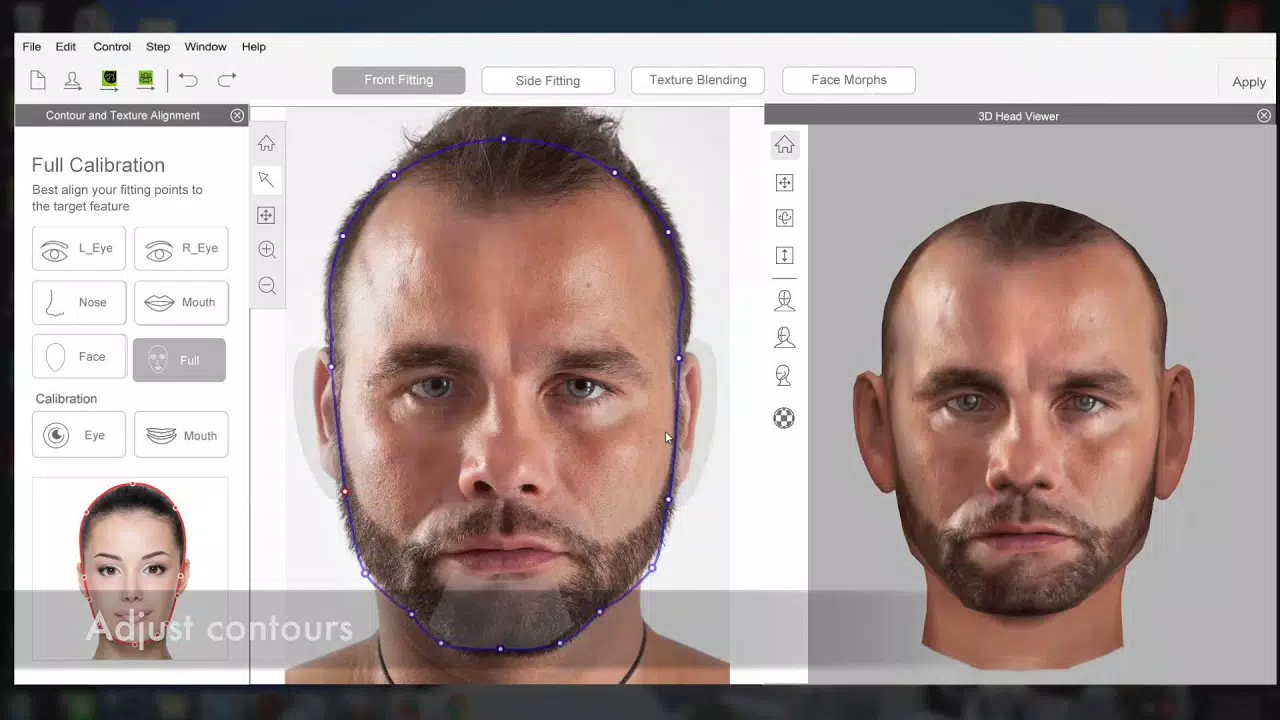
- 3D Head Creation Tool: Allows users to convert 2D facial images into detailed 3D head models. This feature enables the creation of realistic, depth-aware characters from simple source images, expanding the visual potential of animation projects.
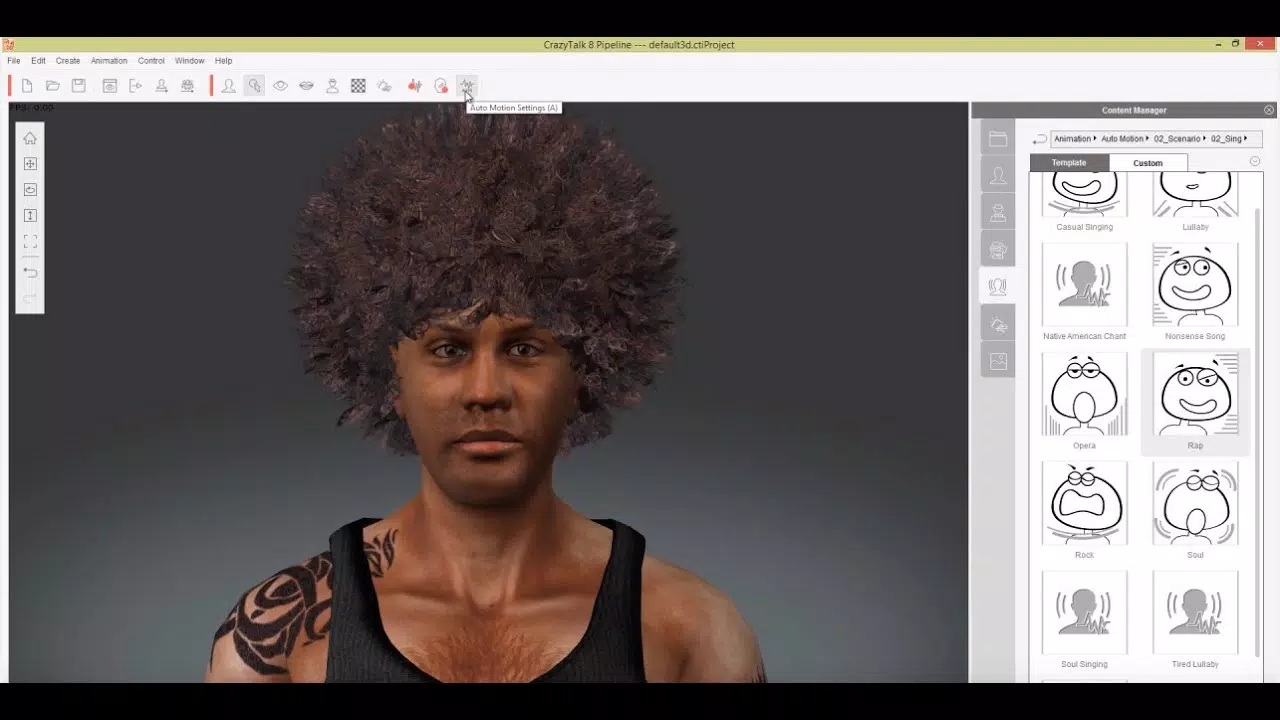
- Auto Motion Engine: Automatically generates facial animations based on voice and text input. This reduces manual effort and accelerates production timelines, particularly for projects requiring multiple characters or lengthy dialogues.
- Smooth Lip-Syncing: Delivers precise synchronization between spoken words and mouth movements. The result is natural-looking speech that enhances viewer immersion and realism in animated content.
- User-Friendly Interface: Features an intuitive layout that simplifies navigation and workflow management. The design supports quick project setup and real-time preview, making it suitable for users with varying levels of animation experience.
- Versatile Animation Projects: Supports diverse applications such as educational videos, marketing content, virtual assistants, and entertainment productions. Its flexibility makes it a valuable tool across multiple industries.
For example, an educator could use CrazyTalk Pipeline to animate a character delivering a lesson, improving audience engagement. A marketing team might create a talking avatar to introduce a product, combining voice and facial expression to convey personality and trust. The software’s ability to transform static images into expressive, animated characters offers a unique advantage in content creation where time and resources are limited.
Interface, UX & Performance
The user interface of CrazyTalk Pipeline is structured around a clean, modular layout that prioritizes accessibility and workflow efficiency. Key tools and panels are logically grouped, allowing users to manage character assets, voice inputs, and animation timelines with minimal navigation. The visual style emphasizes clarity, using consistent color coding and iconography to support intuitive interaction.
Navigating between features such as the 3D head builder, lip-syncing engine, and animation timeline is designed to be seamless, with drag-and-drop functionality and real-time previews. This responsive design helps users visualize changes instantly, reducing iteration time and supporting creative experimentation.
Although the developer did not list formal performance metrics, the application’s ability to process complex animations and generate real-time feedback suggests optimized resource handling. Performance on different device categories was not specified, but given the 3.5 GB file size and Windows platform, it is likely tailored for systems with moderate to high-end specifications. Stability and responsiveness appear to be prioritized, especially in handling continuous voice input and high-resolution character rendering.
Platform Compatibility & Technical Requirements
CrazyTalk Pipeline is available exclusively for the Windows operating system. The current version, 8.0, has a file size of 3.5 GB, indicating a feature-rich application with substantial data and assets. The developer did not specify minimum OS requirements, making it difficult to determine exact compatibility with older or newer Windows versions.
Users should ensure their system meets standard desktop performance benchmarks for running animation software, including sufficient RAM and GPU capabilities. While the exact version of Windows required was not disclosed, the application is likely designed for modern Windows environments such as Windows 10 or 11. No information was provided regarding updates, cloud integration, or cross-platform availability.
Pros and Cons
Pros
- Advanced 3D head creation from 2D images
- Automated animation generation via voice and text input
- High-quality, smooth lip-syncing for realistic speech
- Intuitive interface suitable for beginners and pros
- Wide range of applications across education, marketing, and entertainment
Cons
- Windows-only platform limits accessibility
- High price point of $299.00 may be prohibitive for casual users
- File size of 3.5 GB requires significant storage space
- Compatibility with older Windows versions not confirmed
- No mobile or web-based version currently available
FAQ
Is CrazyTalk Pipeline safe to download and install?
Yes, the software is developed by Reallusion, a reputable company in digital animation tools. As long as it is downloaded from official or trusted sources, it is considered secure.
Can I use CrazyTalk Pipeline for commercial projects?
Yes, the software is licensed for both personal and commercial use. Users are encouraged to review the full license agreement for specific terms related to distribution and monetization.
Does CrazyTalk Pipeline support multiple languages?
While the developer did not specify language support, the software’s text-to-animation engine suggests compatibility with various language inputs, though full localization details were not provided.
How often are updates released for CrazyTalk Pipeline?
Updates are typically released to enhance features and fix issues. The latest version, 8.0, was released in August 2023, indicating regular development activity. Specific update frequency was not disclosed.
Is technical support available for users?
Reallusion offers support through official channels, including documentation, tutorials, and community forums. Direct support options may vary based on licensing and subscription terms.
Final Thoughts
CrazyTalk Pipeline stands out as a powerful and innovative solution for creating realistic facial animations using minimal input. Its combination of 3D head creation, automated motion, and precise lip-syncing makes it a top-tier tool for professionals and serious creators. The user-friendly interface ensures that even those new to animation can achieve impressive results quickly.
While the high price and Windows-only availability may limit accessibility, the software delivers exceptional value for users who require high-quality, lifelike character animation. It is especially beneficial for educators, content producers, and developers building interactive avatars or digital assistants.
For anyone seeking a robust, feature-rich animation utility that brings static images to life with natural expression and speech, CrazyTalk Pipeline offers a compelling solution. The integration of advanced tools into a streamlined workflow sets a new standard in facial animation software.
Download CrazyTalk Pipeline now


